Line Column Positions
This is a short look at how source line / column positions behave in two popular developer tools, rustc and VS Code.
When reporting diagnostics for issues encountered while parsing source code (or other structured formats), it’s necessary to tell the user where the issue occurred.
One nuance is how positions within a line are reported in diagnostics:
fn main() {
    "error"
}
The example above contains an error (“error” is not a valid return value), and the diagnostic indicates the error is located at example.rs:2:5, (line 2, column 5):
   Compiling example v0.1.0 (/private/var/folders/xc/r4p9td3d0815f4r5t08t40c00000gn/T/m000010383531)
error[E0308]: mismatched types
 --> example.rs:2:5
  |
1 | fn main() {
  |          - expected `()` because of default return type
2 |     "error"
  |     ^^^^^^^ expected `()`, found `&str`

For more information about this error, try `rustc --explain E0308`.
error: could not compile `example` (bin "example") due to 1 previous error
However, if we change the program invisibly to use tabs instead of spaces, the reported column position changes to column 2:
fn main() {
	"error"
}
   Compiling example v0.1.0 (/private/var/folders/xc/r4p9td3d0815f4r5t08t40c00000gn/T/m000012383531)
error[E0308]: mismatched types
 --> example.rs:2:2
  |
1 | fn main() {
  |          - expected `()` because of default return type
2 |     "error"
  |     ^^^^^^^ expected `()`, found `&str`

For more information about this error, try `rustc --explain E0308`.
error: could not compile `example` (bin "example") due to 1 previous error
This is because rustc errors aren’t actually reporting the column position at all: they’re the codepoint offset within the line, and not the “visual” column position (which can vary based on the users tab width preferences).
Visual Columns
By contrast, text editors and IDEs do genuinely try to indicate the cursor position by the perceived “visual” column the cursor appears to be in. In simple cases, this is obvious and intuitive:
With a tab being just a single codepoint that visually counts as any of 2, 4, 8, etc. visual columns wide, depending on the users preferences:
c in lines of either indentation type show the cursor as in visual column 9:However, when navigating through lines, the illusion falls apart.
Internally, the cursor position within a line is not tracked as its visual column, but instead as a codepoint offset. This is illustrated by the examples below.
Tab Characters
A tab is one codepoint treated as multiple visual columns wide.
In this example, the cursor starts on “visual” column 13 in an 8-wide tab-indented line, which is the same codepoint offset as column 6 in the line beneath. Pressing the up or down arrows unexpectedly “jumps” the visual position of the cursor horizontally:
Though the character t on the first line and the 6th space on the second line look visually like they’re in different columns, if we look at string contents of each line, we can see that physically they’re both the 6th codepoint in their respective line strings:
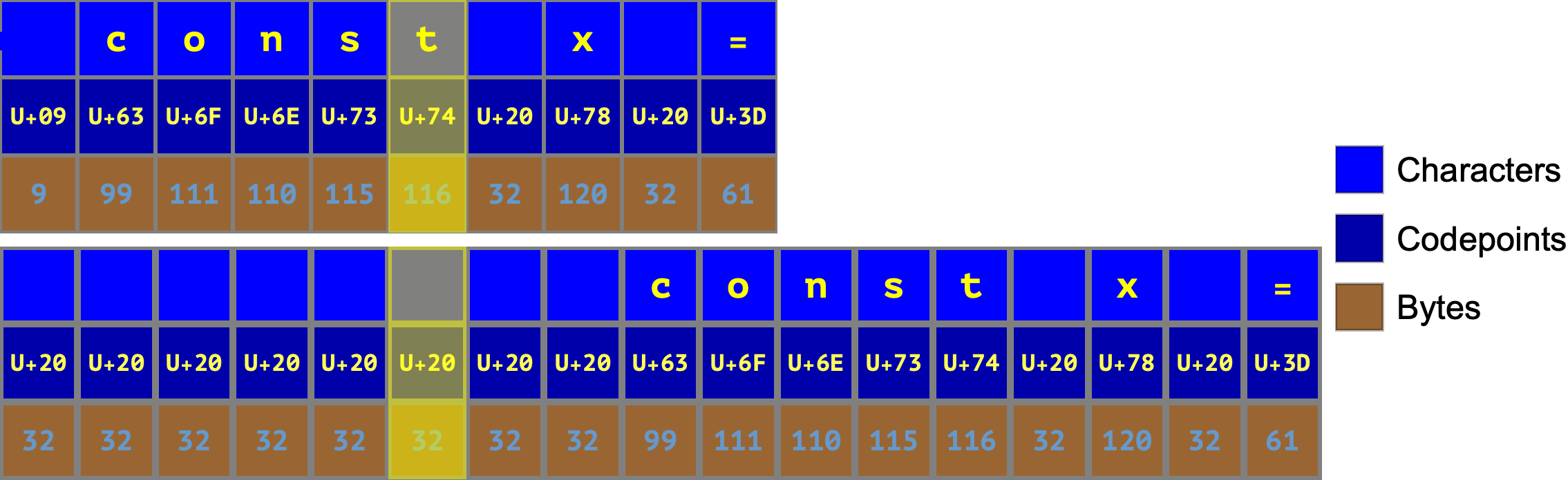
(This illustrates a minor advantage of spaces over tabs in that perennial debate: with space indentation, the “visual” column always exactly matches the “codepoint-offset” column.)
Multi-codepoint characters
Alternatively, some characters are rendered as 1 column wide, but are made up of multiple codepoints, leading to a “column” count much larger than they visually appear to be:
For multiple key-presses, it seems like nothing is happening: the column count is going up, but the cursor doesn’t seem to be moving.
If we break the source text down into its constituent codepoints, we can see what is happening. The cursor is moving, but through combining codepoints, not entire rendered graphemes.
By navigating between lines, we can see that the codepoint/column offset stays the same as we jump between ASCII characters and multi-codepoint graphemes:
In summary, the VS Code ‘Col’ status bar indicator is a mishmash of:
These rules may feel a little inconsistent, but I think they balance “good enough” visual column positions for the common case of tab characters, with unambiguous numeric offsets for multi-codepoint characters.
I hope you enjoyed this brief look at some of the nuances in this design space.